
If you pay for marketing, you want to know if you’re getting a positive return on your investment. A CRM, short for customer relationship management software, is how you find out. Every call, form, and email from your marketing goes into one system, and each one is followed from the first contact to the consultation and the signed case.
We have used a CRM this way with our clients since 2020, and this month we made it an official product, Headwater CRM.

Don’t I Already Have This in My Practice Management Software?
Probably not. Law firms use practice management software after someone becomes a client. It stores matter information, calendars, documents, and billing records.
A marketing CRM such as Headwater tracks the marketing process before someone becomes a client. Each call, form, and email from your marketing is recorded with where it came from, and each lead is followed until that person hires the firm or doesn’t. That helps you measure how well your marketing is working.
Leads the firm paid for can get lost before anyone opens a case. A call goes unreturned, a form stays in an inbox over the weekend, or the caller never books a consultation. None of that appears in your practice management software, because those people never became clients.
What Should My Firm’s CRM Track?
- Every lead, in one place. Calls to the front desk, forms from the website, and emails to an attorney all go into the same system.
- Where each lead came from. The ad, the search result, the Google Business Profile, the referral.
- The stage each lead is at. New, contacted, consultation booked, retained. When you can see the stages, you can spot a lead that stalled and call back before it goes cold.
- How each call was answered. With call recording, you can hear what a caller asked for and how the front desk handled it, including questions about price.
Should My Firm Use a Legal CRM or a General One?
Legal CRM software such as Clio Grow and Lawmatics is built for law firms. General CRM tools such as HubSpot and Zoho CRM are built for any business, so a firm usually has to adapt them to how intake works.
Either kind can work if it records where each lead came from, tracks each lead to the signed case, and has someone keeping it running. Headwater is the second kind. It is built on GoHighLevel, a general platform many marketing agencies use, and we set it up for how law firm intake works.
How Do I See Which Marketing Is Working?
Your ad dashboard can show that one campaign’s leads cost less than another’s. Whether those leads hired you is recorded in your CRM, because that is where each lead is followed past the first click.
We saw this with a law firm client running both Google Ads and Facebook Ads. Facebook was generating far more leads at a much lower cost per lead. Looking at the ad platforms’ numbers alone, Facebook was the clear winner. When we tracked those leads through to signed cases in the CRM, Google Ads was producing a positive return on investment, and Facebook was losing money.
Imagine making your marketing decisions based only on what the advertising dashboards told you. You might have moved more money into Facebook and cut spending on the channel that was actually making you money.
Once each signed case is matched to its campaign, the monthly report shows signed cases by campaign. You can move budget toward the campaigns whose leads hire you and away from the ones whose leads don’t.
Which CRM Do You Use With Your Clients?
We set up Headwater CRM for the law firms whose marketing we run, and we keep it running.
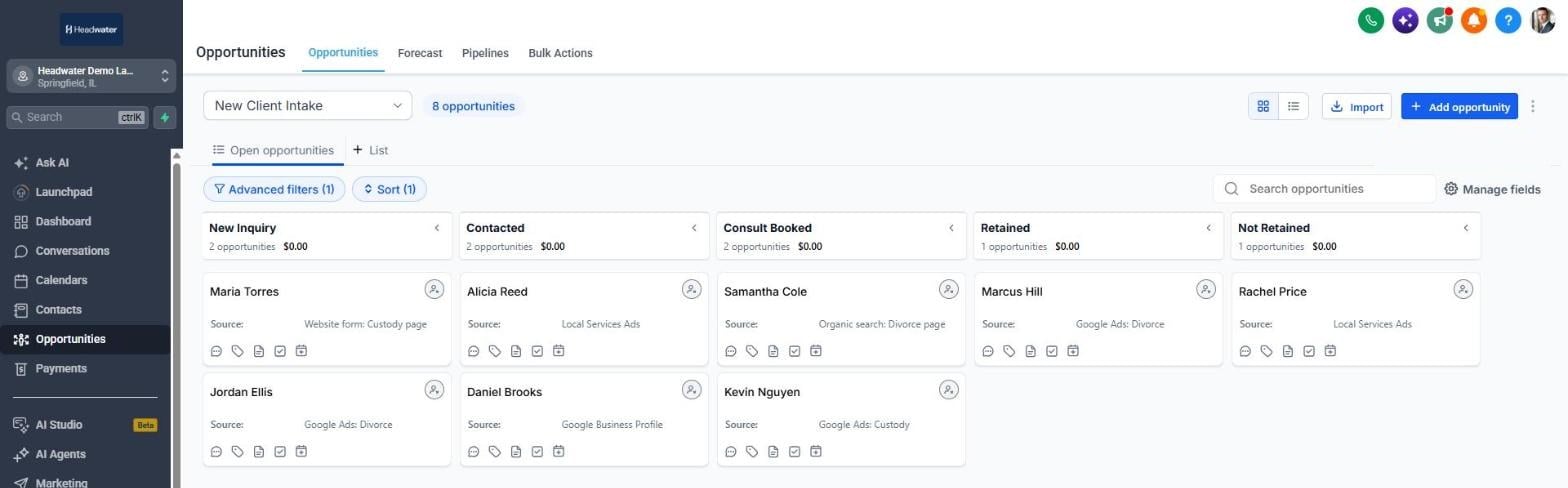
“We use it as part of our marketing program to tie marketing efforts to real revenue,” says Brent Baltzer, our founder. “Having a CRM ties everything together.”
What Else Can Headwater Do for My Firm?
The CRM is the core product, but Headwater also includes other marketing features that can connect to it:
- Email newsletters and follow-up emails to past clients, referral sources, and new leads.
- Social media posting, scheduled from one calendar to Facebook, Instagram, LinkedIn, your Google Business Profile, TikTok, YouTube, Pinterest, Threads, and Bluesky.
- Online booking, with consultations going onto your calendar.
- Review requests sent to clients by email or text.
- Automated workflows, such as an alert to your staff when a new lead comes in or a reminder before a consultation.
Headwater FAQs
Can Headwater connect to my practice management software, such as Clio?
Yes. When a lead becomes a client, Headwater can create the matter in Clio or your other practice management software. The handoff is seamless, and your staff does not retype the client’s details.
Can my prospective clients book a consultation online?
Yes. A prospective client picks a time on your calendar, and Headwater can send a reminder before the consultation.
Will my staff know when a new lead hasn’t been contacted?
Yes. We set up an alert to your staff when a new lead comes in, and we mark each lead by stage, so your staff can see who still needs a call back.
How hard is Headwater for my staff to learn?
We keep it as simple as possible. We set it up around how your firm already handles intake, so your staff’s process isn’t disrupted, and we adjust it as your process changes.
How is my firm’s client information protected?
Headwater runs on GoHighLevel, which has completed a SOC 2 Type II audit covering security, confidentiality, and availability. Data is encrypted in transit and when stored, logins can require two-factor authentication, and user permissions limit what each staff member can see.
What happens to my firm’s data if we stop working with you?
Your firm owns all of its data, and it stays yours if you leave.
What Should I Ask Before Choosing a CRM?
- Does every call, form, and email go into it, or only some of them?
- Does it record where each lead came from?
- Can it show which leads became signed cases?
- Who sets it up and keeps it running?
- How is confidential client information protected, and who can see it?
- If you stop using it, can you export your contacts and their history?
If you want to know which campaigns your signed cases came from, book a free call. We’ll look at how your firm tracks leads today and show you how we would connect each lead to a signed case.